kpnn2







Turn a named edgelist into sparsely connected PyTorch layers you assemble yourself.
Overview
A fully connected neural network (NN), in which every node in one layer connects to every node in the next, is easy to implement in PyTorch.
A sparsely connected NN with skip edges is not. Only some pairs of
nodes are linked, and some edges skip layers. That is the gap
kpnn2 (Knowledge Primed Neural Networks) fills: the same
PyTorch workflow, with that connectivity.
Figure 1 shows a dense NN next to a sparse NN with skip edges.
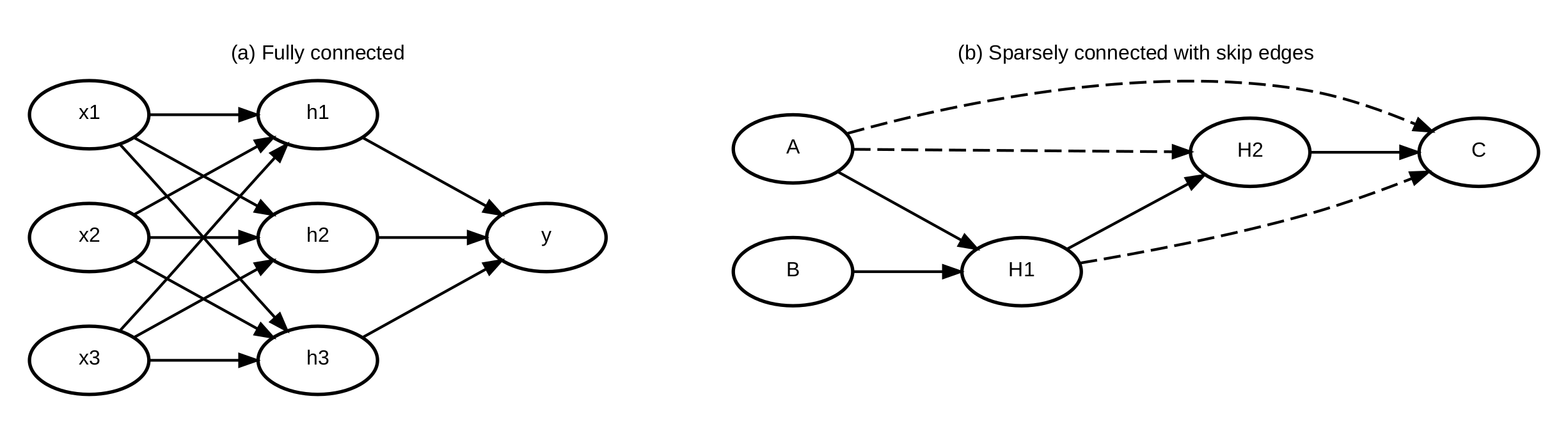
Figure 1. (a) Dense adjacent layers, the usual PyTorch case.
(b) A sparsely connected DAG with skip edges (dashed), the same graph as on
the Skip edges page. kpnn2 turns (b)
into ordinary MaskedLinear hops, one per layer, with the skip
edges inside those masks.
An edgelist is a table of directed connections: each row links
a source node to a target node. For example:
| source | target |
|---|---|
| A | H |
| B | H |
| H | C |
parse_layered() layers that table into a LayeredSpec. You write
a normal torch.nn.Module, train with standard PyTorch, and can
map attributions back onto the named nodes. That parser needs a
DAG; a graph with feedback loops goes through parse_adjacency()
instead, which puts every node into one state vector with packed
edge indices (see the
Recurrent example).
Sparse connectivity is often used for speed or memory, without needing control over which nodes are linked. A newer line of work instead builds the NN so its wiring is a real network, for example a biological or chemical graph. Attributions on the NN nodes then map onto the nodes of that network, which gives the model a direct form of interpretability.
In biology this is an active research area, including pathway-based models (Fortelny and Bock, 2020) and ontology-based models (Elmarakeby et al., 2021). The Getting started notebook walks through a biological example.
kpnn2 is a set of (domain-agnostic) primitives, not a graph compiler. There
is no ready-made model object. Training loops, losses, optimizers,
activations, and heads stay yours.
As a further note, "graph" here means the architecture specification, not a
graph neural network, which cannot be implemented using kpnn2 in PyTorch.
Core workflow
- Define a model architecture as an edgelist with named
sourceandtargetnodes. - Parse it with
parse_layered()to aLayeredSpec. For a graph with feedback loops, useparse_adjacency()and anAdjacencySpecinstead. - Write an
nn.Modulewith oneMaskedLinearperspec.hops, feeding each onegather_hop_inputs(saved, hop). Skip edges are already inside those masks, so there is nothing extra to call. - Align named input tables with
align_inputs(). - Train with ordinary PyTorch.
- Optionally run Captum (or another method) yourself, then label a
layer tensor with
map_node_attributions()(returns xarray). - A checkpoint is
spec.to_dict()plusstate_dict, not weights alone.
The snippet below is a minimal run of steps 1–4, using the
edgelist from the table above. Column order in the input table
does not matter: align_inputs() matches names. Skip edges are
omitted here; see Skip edges. A full
walkthrough, including training and attribution, is in
Getting started.
import pandas as pd
import torch.nn.functional as F
from torch import nn

import kpnn2

edgelist = pd.DataFrame(
    {
        "source": ["A", "B", "H"],
        "target": ["H", "H", "C"],
    }
)
spec = kpnn2.parse_layered(edgelist)


class Net(nn.Module):
    def __init__(self, spec: kpnn2.LayeredSpec):
        super().__init__()
        self.lin0 = kpnn2.MaskedLinear(spec.hops[0].mask)
        self.lin1 = kpnn2.MaskedLinear(spec.hops[1].mask)

    def forward(self, x):
        h = F.relu(self.lin0(x))
        return self.lin1(h)


model = Net(spec)
x = kpnn2.align_inputs(
    pd.DataFrame({"B": [0.2, 0.4], "A": [0.1, 0.3]}),
    spec,
)
y = model(x)
# Continue training with ordinary PyTorch.
API
The documented public names are:
parse_layered()parse_adjacency()LayeredSpecHopSkipAdjacencySpecMaskedLinearPackedLineargather_hop_inputs()align_inputs()map_node_attributions()
LayeredSpec.hops holds one Hop per layer after the first, and
a hop's mask carries every edge entering that layer, skip edges
included. LayeredSpec.skips lists which edges span layers, as
metadata. An AdjacencySpec has no layers and no skips: it carries
packed source_index / target_index over all nodes, plus
input_index and output_index into that state vector.
to_mask() densifies for MaskedLinear on small graphs.
See the API reference for details, and Skip edges for a worked example.
Package philosophy
kpnn2 is intentionally minimally opinionated.
It owns edgelist parsing, mask tensors, hop input assembly, named input alignment, and attribution column names. It does not impose broader modeling choices such as:
- activation functions
- output heads
- dropout
- loss functions
- optimizers
- training loops
Those remain part of the normal PyTorch workflow:
kpnn2turns the edgelist into structure you can execute- PyTorch handles
forward(), training, and customization - you map trained tensors back to named nodes when you want interpretation
Installation
Requires Python 3.10 or later.
pip install kpnn2
Start here
If you are new to the package, start with a tutorial:
- Installation for package setup
- Getting started for a full end-to-end feedforward example
- Recurrent example for
parse_adjacency()and a sharedMaskedLinearover one state vector when the graph has feedback loops (parse_layeredstill requires a DAG)
The other pages explain a design choice; they are not second examples:
- Layered vs. Adjacency for how the two parsers differ and when to pick one
- Skip edges for edges that jump a layer, and why they need no separate mechanism
- Mapping attributions for labeling layer tensors with node names
- PackedLinear when
nis large on anAdjacencySpec - API reference for function- and object-level documentation
Citation
If you use kpnn2 in research, please cite the software.
Citation metadata is available in
CITATION.cff.
License
This project is licensed under the MIT License. See the LICENSE file on GitHub for details.